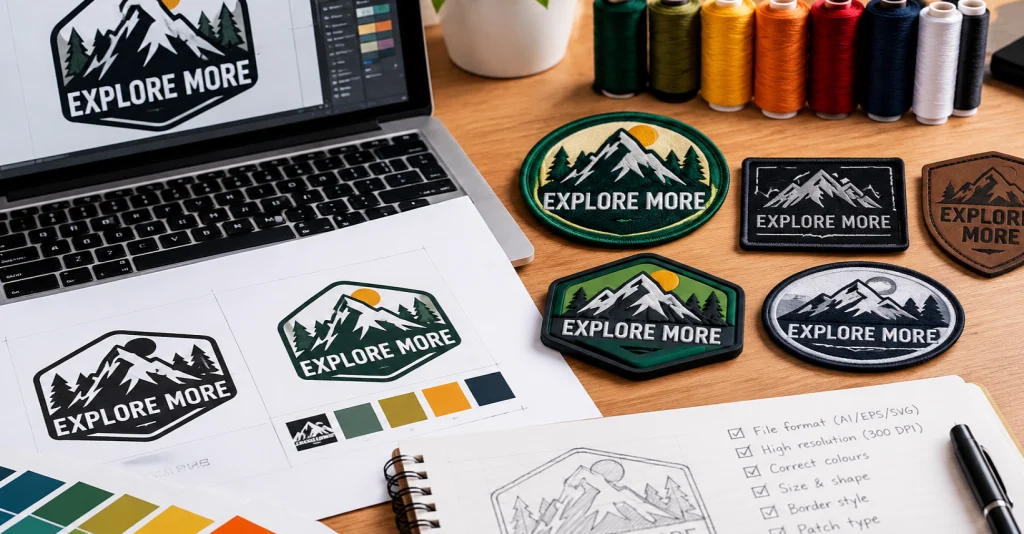
Custom patches have become an important part of modern branding, fashion, uniforms, promotional merchandise and personal expression. Businesses use them to display their logos, sports teams use them to represent their identity, and clothing brands incorporate them into their collections to create unique and recognisable products.
Whether you are designing patches for a company uniform, launching a clothing brand, creating team badges or producing promotional merchandise, the quality of your finished patch depends on several important factors. One of the most important is the artwork you provide.
A logo that looks perfect on a computer screen does not always translate perfectly into a physical patch. Small lettering, complicated illustrations, thin lines, colour gradients and unnecessary details can create challenges during manufacturing. This is especially important when producing embroidered and woven patches, where thread and fabric determine how the final design appears.
Preparing your artwork correctly helps manufacturers understand your requirements, choose suitable materials, reproduce your design accurately and create a professional-looking finished product.
At Patches Maker USA, we understand that every custom patch begins with an idea. Whether you already have professional logo artwork or simply have a rough sketch, preparing the design properly can make the entire production process easier.
In this complete guide, we will explain how to prepare your logo for high-quality custom patch production, including artwork formats, image resolution, colour selection, typography, patch dimensions, decoration methods, borders and final production approval.
1. Start with a Clear and Professional Logo Design
The first step in preparing your logo for custom patch production is making sure the original artwork is clear.
Your logo represents your business, team or organisation. It should communicate your identity in a way that remains recognisable when reproduced on fabric, PVC, leather or other patch materials.
A complicated design might look impressive on a large computer monitor, but it can become difficult to reproduce when reduced to a small patch.
For this reason, start by reviewing your logo and identifying its most important elements.
Consider the following:
- Is your company name easy to read?
- Are the main symbols clearly visible?
- Are the colours appropriate?
- Does the design contain unnecessary details?
- Can the logo be recognised at a smaller size?
- Are all elements positioned correctly?
For example, a business logo might contain a company name, a decorative symbol, a slogan and several small graphic details.
If you want to produce a patch measuring approximately 3 inches, including every small detail may not be practical. You could create a simplified version that preserves the main symbol and company name.
This does not mean changing your brand identity. It means adapting the artwork to suit the manufacturing process.
A clean and balanced design gives manufacturers a better starting point and helps improve the appearance of the final patch.
2. Choose the Right File Format for Your Logo
One of the most important parts of preparing artwork is selecting the correct file format.
Different file types store images in different ways. Some preserve sharp edges when resized, while others can lose quality when enlarged.
For custom patch production, vector artwork is generally the preferred option.
Vector File Formats
Vector files use mathematical paths rather than fixed pixels to represent artwork. This allows designers to resize logos without losing their original sharpness.
Popular vector formats include:
AI (Adobe Illustrator): AI files are widely used by professional graphic designers. They preserve editable artwork, shapes, colours and design elements.
EPS (Encapsulated PostScript): EPS files are useful for sharing vector artwork between different design and production systems.
SVG (Scalable Vector Graphics): SVG files are commonly used for scalable logos and illustrations. They are particularly useful for clean shapes, symbols and typography.
PDF (Portable Document Format): A properly exported vector PDF can preserve detailed artwork and is often suitable for sharing final design files.
These formats are particularly useful when your logo needs to be resized, adjusted or prepared for different patch sizes.
Raster File Formats
Raster images are made up of individual pixels. Their quality depends on the image dimensions and resolution.
Common raster formats include:
PNG: PNG files are useful for logos with transparent backgrounds. They are a good option when you need to share clean artwork without a surrounding background.
JPG or JPEG: JPEG files are commonly used for photographs and general image sharing. However, repeated compression can reduce image quality.
PSD: Photoshop files can preserve editable layers and design elements, depending on how the file was saved.
If you only have a PNG or JPEG logo, do not worry. A professional designer can often use it as a reference to recreate or prepare the artwork for production.
Which Format Should You Choose?
| File Format | Best Use |
|---|---|
| AI | Editable professional vector artwork |
| EPS | Scalable logo and illustration files |
| SVG | Clean vector graphics |
| Sharing production-ready artwork | |
| PNG | High-resolution logos with transparent backgrounds |
| JPG | Photographs and general logo references |
| PSD | Layered Photoshop artwork |
Whenever possible, provide the original vector file along with a PNG preview. This gives the production team both editable artwork and an easy visual reference.
3. Make Sure Your Logo Has Sufficient Image Resolution
If your logo is saved as a raster image, resolution is another important consideration.
A low-resolution logo may appear acceptable when viewed at a small size, but enlarging it can reveal blurry edges, visible pixels and unclear details.
These problems can make it harder to reproduce the artwork accurately.
For most raster artwork intended for printed patches, 300 DPI at the final production size is a useful target.
For example, if you want a printed patch measuring 4 inches wide, preparing an image approximately 1200 pixels wide at 300 DPI provides a suitable starting point.
However, embroidered and woven patches involve additional preparation. Their artwork must be translated into stitch patterns or woven thread arrangements, so simply increasing the image resolution does not automatically make the design production-ready.
How to Identify a Low-Quality Logo
Look for these common problems:
- Blurry edges around the logo.
- Pixelated lettering.
- Distorted symbols.
- Unclear small details.
- Visible compression marks.
- Uneven outlines.
If your original logo has these problems, it is better to obtain the original artwork or have it professionally recreated before production.
Avoid using screenshots from websites or social media as your primary production artwork when a better-quality original is available.
4. Simplify Complicated Details Before Production
One of the biggest mistakes customers make is assuming every element of their digital logo can be reproduced exactly on a small patch.
Different patch manufacturing methods have different limitations.
Embroidery uses thread to create the design. Woven patches use interlaced threads, while PVC patches use moulded material and printed patches use ink.
Each method reproduces detail differently.
For example, extremely thin lines and tiny lettering can be difficult to reproduce through embroidery. On a small patch, these elements may become unclear or merge together.
Before submitting your artwork, identify any details that may need adjustment.
Remove Unnecessary Small Elements
If your logo includes decorative lines, tiny stars, small text or complicated background patterns, consider whether they are essential.
Removing unnecessary elements can make the main design more visible.
Improve Letter Spacing
Text that looks readable on a computer may become crowded when converted into stitches.
Allow enough space between letters and avoid unnecessarily complicated typography.
Use Clear Shapes
Simple shapes are easier to recognise and can create a stronger visual result.
For example, a clean shield, circle, rectangle or custom emblem can work well for many patch designs.
Preserve Important Brand Features
Although simplifying artwork can help, avoid removing elements that make your logo recognisable.
Your brand symbol, important wording and distinctive design features should remain part of the final artwork whenever possible.
The goal is to create a design that looks professional while remaining suitable for the selected production method.
5. Select the Right Patch Type for Your Logo
Before finalising your artwork, decide which type of custom patch you want to manufacture.
This is important because the selected production method affects how your logo should be prepared.
At Patches Maker USA, different patch styles can be used for fashion, uniforms, sports teams, organisations and promotional merchandise.
Here are some popular options.
Custom Embroidered Patches
Embroidered patches are created by stitching coloured threads onto a fabric backing.
They offer a textured appearance and are widely used for clothing, jackets, hats, uniforms and bags.
They are particularly suitable for:
- Company logos.
- Sports team emblems.
- School badges.
- Club insignias.
- Simple illustrations.
- Traditional branding designs.
When preparing an embroidered logo, focus on clear shapes, suitable thread colours and readable lettering.
Very small details may need to be simplified to achieve a clean finish.
Custom Woven Patches
Woven patches are produced by weaving threads together to create the design.
Unlike traditional embroidery, woven patches have a flatter surface and can reproduce smaller details more effectively.
They are useful for logos containing:
- Fine lettering.
- Detailed symbols.
- Thin outlines.
- Small decorative elements.
- Intricate illustrations.
If your logo contains small text that may not work well with embroidery, woven patches could be a better alternative.
Custom PVC Patches
PVC patches are made from flexible polyvinyl chloride material.
They offer a distinctive appearance with raised and recessed sections, making them suitable for bold branding and durable applications.
PVC patches are often used for:
- Outdoor clothing.
- Tactical equipment.
- Backpacks.
- Sports accessories.
- Workwear.
- Promotional products.
When preparing PVC artwork, consider how different sections will be separated by raised outlines and moulded details.
Clear shapes and well-defined colour areas help create an effective design.
Custom Printed Patches
Printed patches are an excellent option when your artwork contains many colours, gradients or complicated illustrations.
Instead of recreating the entire image using thread, the design is reproduced through a printing process.
Printed patches can be useful for:
- Photographic artwork.
- Complex illustrations.
- Multi-colour logos.
- Fine gradients.
- Detailed graphics.
If your logo contains many subtle colour changes, printed patches may preserve more of the original appearance than traditional embroidery.
Custom Chenille Patches
Chenille patches feature a soft, textured surface created using specialised yarn.
They are particularly popular for varsity jackets, school merchandise, sports clothing and fashion collections.
Bold lettering, large initials and simple graphic shapes are especially suitable for chenille designs.
Custom Leather Patches
Leather and leather-look patches create a distinctive appearance that works well with premium clothing, denim, caps and bags.
Logos are commonly applied through embossing, debossing or engraving, depending on the material and desired finish.
Simple logos and strong typography generally work particularly well.
Choosing the right patch type before finalising your artwork helps ensure that your logo is prepared for the correct manufacturing process.
6. Choose the Right Colours for Your Custom Patch
Colour selection plays an important role in creating an attractive patch.
Your colours should reflect your brand identity while remaining clear and visually balanced.
Digital screens display colours differently from physical thread, printed materials and PVC. This means your finished patch may not look exactly like the original design on your monitor.
To improve colour consistency, provide clear colour references.
Use Your Official Brand Colours
If your business already has established brand guidelines, use those colours when preparing your patch artwork.
You can provide:
- Pantone colour references.
- CMYK values.
- RGB values.
- HEX colour codes.
- Existing brand colour samples.
Pantone references can be particularly helpful when discussing physical colour matching.
However, exact matching may vary depending on the available thread, fabric, printing process and material.
Avoid Using Too Many Colours
Although some patch types can reproduce many colours, an excessive number of shades can make a small design look crowded.
A focused colour palette often creates a cleaner result.
For example:
- Black, white and red for a bold sports logo.
- Navy, gold and white for a professional organisation.
- Green, cream and brown for an outdoor brand.
- Black and silver for a modern clothing label.
Consider Colour Contrast
Your logo should remain visible against the patch background.
If the background and logo colours are too similar, important details may disappear.
For example, dark navy lettering on a black background may be difficult to recognise.
Using lighter thread or a contrasting border can improve visibility.
7. Prepare Your Typography and Text Correctly
Text is one of the most important elements of many custom patches.
Company names, team names, slogans, establishment dates and membership details are commonly included in patch artwork.
However, small lettering can create challenges during production.
The size and style of your text should match the dimensions of your finished patch.
Choose Readable Fonts
Bold and simple fonts are generally easier to reproduce than extremely thin or decorative lettering.
Sans-serif fonts and block lettering are popular choices for sports patches, uniforms and corporate branding.
Traditional serif fonts can also work well when the letters are sufficiently large.
Convert Fonts into Outlines
When sharing editable vector files, convert text into outlines or paths whenever possible.
This helps preserve the exact appearance of your typography even if the production team does not have the original font installed.
Check Spelling Carefully
Before submitting your design, double-check every word, date, number and abbreviation.
This is particularly important for:
- Company names.
- School names.
- Team names.
- Military or organisational titles.
- Event dates.
- Personalised wording.
A spelling mistake discovered after production can result in unnecessary rework.
Avoid Extremely Small Text
If your patch contains a long company name or slogan, consider whether the wording can be shortened.
Small text may need to be enlarged or reproduced using a woven or printed patch instead of embroidery.
The correct approach depends on the finished patch size and the production method.
8. Decide the Correct Patch Size Before Finalising Artwork
Patch size should be considered early in the design process.
A logo that looks balanced on a large patch may appear crowded when reduced.
Similarly, a design created for a small patch may look too empty when enlarged.
Before preparing the final artwork, decide where the patch will be used.
Popular applications include:
- Jacket sleeves.
- Jacket chests.
- Shirt pockets.
- Baseball caps.
- Backpacks.
- Uniforms.
- Sports jerseys.
- Workwear.
- School clothing.
Each location has different space requirements.
For example, a patch intended for the front of a baseball cap may need a wider, more compact shape.
A jacket-back patch can accommodate larger artwork and more detailed elements.
Measure Width and Height
Always provide the intended dimensions in inches or centimetres.
For irregular shapes, measure the widest and tallest points of the design.
For example:
| Patch Style | Example Dimensions |
|---|---|
| Small logo patch | 2 × 2 inches |
| Rectangular patch | 3 × 2 inches |
| Circular patch | 3 inches diameter |
| Medium emblem | 4 × 3 inches |
| Large jacket patch | 10 × 10 inches |
These are illustrative dimensions, not fixed manufacturing limits.
Your final size should depend on the available application area and the amount of detail in your artwork.
9. Understand Borders and Edge Finishing
A patch border provides structure, helps define the shape and contributes to the finished appearance.
Different border styles are suitable for different designs.
Merrowed Borders
Merrowed borders create a raised, stitched edge around a patch.
They are commonly used for traditional circular, rectangular and other relatively simple shapes.
This style gives patches a classic embroidered appearance.
Laser-Cut Borders
Laser-cut edges allow manufacturers to create more detailed and irregular shapes.
They are useful for custom outlines, intricate emblems and designs that do not fit traditional patch shapes.
Die-Cut Borders
Die-cut borders are used to create specific patch shapes using a cutting process.
They are particularly suitable for designs that require a distinctive outline.
Why the Border Matters
Your logo should have enough space between its important elements and the outer edge.
Avoid placing text or symbols too close to the border.
The manufacturer may need to adjust the artwork slightly to accommodate the border construction.
Discuss your preferred finishing style before approving the final design.
10. Prepare Your Artwork Background Correctly
Another important part of preparing your logo is making sure the background is clearly defined.
Many logos are supplied as images with white, black or coloured backgrounds.
However, the background of the image is not necessarily intended to become part of the patch.
If you want the patch background to use a particular fabric or material colour, communicate this clearly.
For example, imagine your logo contains a white mountain symbol and green lettering.
You may want the mountain and lettering reproduced on a black patch background.
If you submit an image with a white rectangular background without explaining your requirements, the manufacturer may need clarification.
A transparent PNG or clean vector file can help distinguish the actual artwork from its background.
When preparing your design, specify:
- Which elements should be included.
- Which areas should remain transparent.
- The preferred patch background colour.
- Whether an outline or border is required.
- Whether the shape should follow the logo or use a standard shape.
Clear instructions reduce confusion and make the design approval process easier.
11. Understand the Importance of Embroidery Digitising
If you are ordering embroidered patches, your artwork must be converted into a format that an embroidery machine can understand.
This process is called embroidery digitising.
Digitising converts visual artwork into a stitch plan. It determines how the machine will reproduce the design using different thread movements and stitch types.
The digitising process considers several factors:
Stitch direction: Determines the direction in which threads are placed.
Stitch density: Controls how closely the stitches are positioned.
Underlay stitching: Provides a foundation that helps support the main embroidery.
Stitch sequence: Determines the order in which different design sections are embroidered.
Thread selection: Matches the intended colours as closely as possible.
Poor digitising can cause several problems, including uneven lettering, distorted shapes, excessive thread density and gaps in the design.
A properly digitised logo helps produce a more consistent and professional embroidered patch.
This is why submitting a clean logo and communicating your intended patch size are so important.
Remember that an image file such as PNG or JPG is not automatically an embroidery machine file. It must be prepared and digitised for production.
12. Consider the Purpose and Placement of Your Patch
The intended use of your patch should influence its design.
A patch for a corporate uniform has different requirements from one created for a fashion collection.
Understanding the application helps you select the right material, backing, size and decoration method.
Patches for Clothing Brands
Fashion brands often use custom patches to create a distinctive identity.
Minimalist logos, leather-look patches, woven labels and embroidered artwork are popular choices.
The patch should complement the garment rather than overpower its overall appearance.
Patches for Sports Teams
Sports teams use patches to represent their colours, logos, achievements and team identity.
Bold lettering and recognisable symbols are useful for creating visible designs.
The artwork should remain clear when applied to jerseys, jackets and training clothing.
Patches for Businesses
Businesses commonly use patches on uniforms, workwear and promotional products.
Professional logos with clear typography and consistent brand colours can create a coordinated appearance.
Patches for Schools and Clubs
School badges, club emblems and achievement patches often contain names, symbols and establishment dates.
These designs should be carefully checked to ensure that all wording and important details are correct.
Patches for Outdoor and Tactical Equipment
Outdoor organisations and equipment brands may prefer PVC or durable embroidered patches.
The design should be practical, recognisable and suitable for the intended application.
13. Select the Right Backing for Your Custom Patch
The backing is the part of the patch that allows it to be attached to clothing, bags or other products.
It is important to select the right backing before production because it affects how the patch will be applied and used.
Sew-On Backing
Sew-on backing is a traditional option.
The patch is attached using stitching around its edges or through designated areas.
It is useful for jackets, uniforms, bags and other fabric products.
Iron-On Backing
Iron-on backing includes a heat-activated adhesive.
It can be applied to suitable fabrics using the recommended heat and pressure instructions.
Always check the compatibility of the garment material before applying heat.
Hook and Loop Backing
Hook and loop backing is commonly used for tactical gear, outdoor clothing and removable identification patches.
It allows patches to be attached and removed when needed.
Adhesive Backing
Adhesive backing provides a convenient option for temporary applications.
It is useful for certain promotional and decorative purposes, depending on the surface.
Plastic Backing
Plastic backing can provide additional structure and support for selected patch styles.
The best backing depends on the garment, application method and expected use.
Discuss your intended application with the manufacturer before confirming your order.
14. Request a Digital Proof Before Production
A digital proof is one of the most valuable steps in the custom patch manufacturing process.
It allows you to review how the artwork is expected to look before production begins.
At Patches Maker USA, our ordering process includes design submission and digital proof approval before manufacturing.
A proof gives you an opportunity to check important details such as:
- Overall patch shape.
- Artwork placement.
- Patch dimensions.
- Background colour.
- Thread or material colours.
- Border style.
- Text accuracy.
- General design appearance.
Review every part carefully.
Do not focus only on the logo itself. Consider how the complete patch will look when all the elements are combined.
If something is incorrect, request adjustments before approving the design.
For embroidered patches, remember that a digital proof is a visual representation rather than an exact simulation of individual stitches. If the project is particularly detailed or important, ask whether a physical sample or production sew-out is available.
Taking the time to approve the design properly can help prevent avoidable production issues.
15. Common Logo Preparation Mistakes to Avoid
Even a professional logo can create problems if it is not prepared correctly.
Here are some mistakes worth avoiding when submitting artwork for custom patch production.
Using Low-Resolution Images
Blurry images and screenshots can make it difficult to identify the exact shape of the artwork.
Always provide the clearest original file available.
Including Too Many Small Details
Tiny symbols and decorative lines may disappear or become unclear when reproduced on a small embroidered patch.
Simplify unnecessary details where appropriate.
Ignoring the Final Patch Size
Artwork should be reviewed at its intended production dimensions.
A design that looks excellent when enlarged may not work at the actual patch size.
Choosing Inappropriate Colours
Colours that blend together can make important design elements difficult to recognise.
Check contrast and provide colour references.
Using Difficult Fonts
Thin or highly decorative lettering may become unclear during embroidery.
Select fonts that are readable at the intended dimensions.
Forgetting the Border Area
Important artwork placed too close to the edge may interfere with the finishing process.
Leave sufficient space around the main design.
Not Specifying the Patch Type
Embroidered, woven, printed and PVC patches have different manufacturing requirements.
Tell your manufacturer which finish you prefer, or ask for advice if you are unsure.
Skipping the Proof Approval Stage
Never assume that the first digital preview will automatically contain every detail exactly as intended.
Review the complete proof before approving production.
Avoiding these mistakes can make the manufacturing process smoother and help you achieve a better finished product.
16. How to Submit Your Logo for Custom Patch Production
Once your artwork is ready, the next step is providing the manufacturer with the information needed to prepare your order.
A complete submission makes it easier to understand your requirements and provide suitable recommendations.
Try to include the following information:
1. Logo artwork: Send your original AI, EPS, SVG, PDF or high-resolution PNG file.
2. Patch type: Specify whether you want embroidered, woven, PVC, printed, chenille or leather patches.
3. Patch dimensions: Provide the intended width and height.
4. Patch shape: Explain whether you want a circular, rectangular, shield-shaped or custom-shaped design.
5. Colour requirements: Include brand colours or colour references where available.
6. Border style: Mention your preferred border or edge finishing.
7. Backing type: Select sew-on, iron-on, hook and loop or another suitable backing.
8. Quantity: Specify the number of patches you require.
9. Application: Explain whether the patches will be used on uniforms, jackets, caps, backpacks or another product.
10. Deadline: Share your required delivery date if you have one.
Providing these details from the beginning helps reduce unnecessary communication and makes it easier to prepare an accurate production proof.
If you do not have professional artwork, you can still submit your existing logo, photograph, sketch or design idea for assessment.
17. Why Professional Logo Preparation Makes a Difference
Preparing your logo properly is not just a technical requirement. It is an important investment in the quality of your finished product.
A well-prepared design offers several advantages.
Better Design Accuracy
Clean artwork makes it easier to reproduce the correct shapes, colours and proportions.
Improved Readability
Appropriate lettering and simplified details help keep your logo recognisable.
More Suitable Production Methods
Understanding the artwork allows manufacturers to recommend a patch style that matches the design.
Fewer Unnecessary Revisions
Clear instructions and correct files can reduce the number of changes needed before approval.
More Consistent Branding
Professional artwork helps maintain a consistent appearance across different patch sizes and product collections.
Better Customer Experience
High-quality patches can improve the appearance of uniforms, merchandise and branded clothing.
For businesses and organisations, these benefits can contribute to a stronger and more professional brand image.
18. Work with Patches Maker USA for Your Custom Patch Designs
Choosing the right manufacturer is an important part of creating high-quality custom patches.
You need a team that understands different patch materials, artwork requirements, production methods and finishing options.
At Patches Maker USA, we work with businesses, clothing brands, sports teams, schools, clubs and organisations looking for personalised patch solutions.
Our website offers a variety of patch styles, including embroidered, woven, PVC, chenille, leather and printed patches.
We also provide design support to help customers turn their existing logos or creative ideas into custom patch designs.
Our process is designed to make ordering straightforward:
Step 1: Submit Your Design
Share your logo, artwork, sketch or reference image along with your preferred patch requirements.
Step 2: Review Your Digital Proof
Check the proposed design, colours, dimensions, border and other details before production.
Step 3: Approve Production
Once the design is approved, the manufacturing process can move forward.
Step 4: Quality Inspection and Delivery
Finished patches are checked before packaging and shipment.
Whether you need a small collection for a new clothing brand or a larger order for uniforms and promotional merchandise, selecting the right artwork and production specifications is essential.
19. Final Checklist: Is Your Logo Ready for Production?
Before submitting your artwork, use this checklist to review the most important requirements.
- Your original logo file is clear and high quality.
- Vector artwork is available where possible.
- Raster images have sufficient resolution.
- All text has been checked for spelling.
- Fonts are suitable for the selected patch type.
- Small and unnecessary details have been reviewed.
- Brand colours have been identified.
- The final patch dimensions have been selected.
- The intended patch shape is clear.
- Border requirements have been discussed.
- The correct patch type has been selected.
- Backing requirements have been confirmed.
- The intended application has been explained.
- The digital proof has been carefully reviewed.
Completing these steps gives your manufacturer a much clearer understanding of your design and helps prepare your logo for the next stage.
Conclusion
Preparing your logo for high-quality custom patch production requires careful attention to artwork, file formats, resolution, colours, typography, dimensions and manufacturing methods.
A professional-looking design is not necessarily production-ready. Your artwork must also be suitable for the material and decoration technique you have selected.
Vector files provide a useful starting point because they can be resized without losing sharpness. Clear typography, appropriate colour combinations and simplified details can improve the appearance of embroidered and woven patches. For more complicated artwork, printed or PVC patches may offer a better solution.
It is equally important to confirm the patch size, border, backing and intended application before production begins. Reviewing a digital proof gives you an opportunity to identify changes and approve the final design with greater confidence.
Whether you are creating branded merchandise, school badges, sports team emblems, corporate uniform patches or a new fashion collection, proper artwork preparation can make a significant difference.
At Patches Maker USA, we believe every great custom patch starts with a well-prepared design. Our goal is to help turn your creative ideas into personalised patches that represent your brand, team or organisation with confidence.